
This icon list section is only visible in Designer and Editor View. On live page you will not see this icon list.

icon-preview.svg
icon-sub-object-green.svg
icon-spark.svg
icon-spark-infinite.svg
icon-alpha-zero.svg
icon-alpha.svg
icon-replace.svg
icon-eye-hidden.svg
icon-eye.svg
icon-ai-sparkles.svg
Icon_Apple_VideoPlus.svg
Icon_Apple_PersonViewfinder.svg
icon-app-settings.svg
jig-info-settings.svg
icon-object-property-panel.svg
icon-snap-vertex.svg
icon-object-hierarchy.svg
icon-snap-face.svg
icon-share-jig.svg
icon-shareplay.svg
icon-person.svg
icon-person-slash.svg
icon-join-presentation.svg
icon-gallery.svg
icon-ellipsis.svg
icon-close.svg
icon-clear-annotation.svg
icon-audio-avp.svg
icon-attachments.svg
icon-arrow-forward.svg
icon-arrow-backward.svg
icon-annotation.svg
icon-swatch-texture.svg
icon-swatch-texture-delete.svg
icon-reset.svg
icon-library.svg
icon-check.svg
icon-team-black.svg
icon-explode.svg
icon-visible.svg
icon-view.svg
icon-video.svg
icon-unlocked.svg
icon-unlock.svg
icon-undo.svg
icon-target.svg
icon-sub-object-mode.svg
icon-stop.svg
icon-start-recording.svg
icon-select-all.svg
icon-scale.svg
icon-save.svg
icon-rotate.svg
icon-rotate-blue.svg
icon-remove.svg
icon-redo.svg
icon-record.svg
Icon previous.svg
icon-previous-step.svg
icon-play.svg
icon-pause.svg
icon-paste.svg
icon-ok.svg
icon-offline.svg
icon-object-mode.svg
Icon-next.svg
icon-next-step.svg
icon-multiselect.svg
icon-move.svg
icon-more.svg
icon-more-settings.svg
icon-mic-on.svg
icon-mic-off.svg
icon-locked.svg
icon-lock.svg
icon-lasso-select.svg
icon-lasso-deselect.svg
icon-label.svg
icon-knowledge.svg
icon-invisible.svg
icon-information.svg
icon-home.svg
icon-flatmode.png
icon-duplicate.svg
icon-dropper.svg
icon-delete.svg
icon-delete-audio.svg
icon-copy.svg
icon-colour.svg
icon-camera.png
icon-back.svg
icon-audio.svg
icon-ar.svg
icon-all.svg
icon-all-previous.svg
icon-all-after.svg
icon-add-user.svg
icon-add-steps.svg
icon-add-object.svg
icon-3d-object-blue.svg
Menu bar layout

Menu bar layout

The Menu bar has everything you need to add information, present, and modify your presentation.
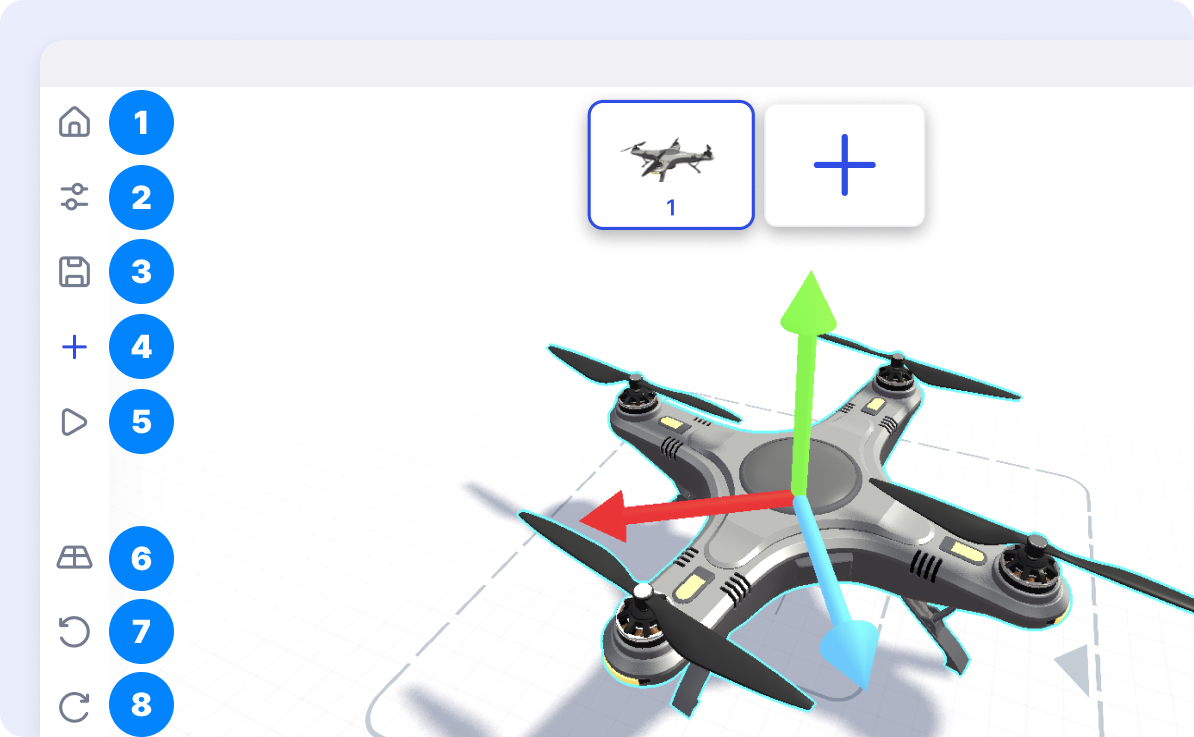
1. Home

The Home button {icon-home.svg} will take you back to My Jigs in the Create section.

2. Information menu

The Information menu {icon-information.svg} allows you to add name, description, tags, thumbnail, and more to your Jig presentation.

3. Save

The Save button {icon-save.svg} allows you to save the latest changes of your Jigs.

4. Add model

The Add model tool {icon-add-object.svg} allows you to load an object into a scene. You can select object from the library or load your own.

5. View in AR

The preview button {icon-preview.svg} allows you to see your presentation in Augmented Reality (AR) or in flat 3D mode.

6. Camera perspectives

The View button {icon-view.svg} allows you to quickly jump through different perspectives. It updates the camera from Front, Left, Top, and Three-Quarter views.

7. Undo

The Undo button {icon-undo.svg} allows you to undo your previous action.

8. Redo

The Redo button {icon-redo.svg} allows you to restore any action that was previously undone using an undo.

Previous featureNext feature